
Where to find JAINE
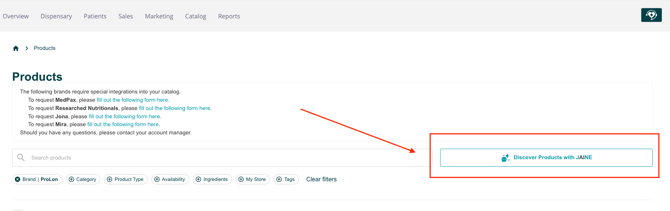
JAINE lives on the Products page of your admin catalog.
- In the top navigation, open Catalog and select Products.
- Next to the Search products bar, click Discover Products with JAINE. Hovering the button shows the tooltip "Use AI for advanced product discovery."
- The Product Discovery by JAINE panel opens, with a chat on the left and a Recommended Products list on the right.
- Ask your question. Type it into the Hi. How can I help you today? box at the bottom of the chat panel and send it.
- Read JAINE's answer. The response shows how long it took (for example, "Finished in 18s"), a written answer, and a count of matching products (for example, "I found 29 products").
- Open the product list. Click View Products to open the Recommended Products panel on the right.
- Browse the results. Scroll the panel to review each product card. Every card shows:
- A category tag, such as Personal Care, Home Care, Nutrition, Equipment, or Miscellaneous
- Product name and brand
- A short description
- Price, plus size or serving count when available
- Keep the conversation going. Click one of the Suggested Questions under the answer, or type a follow-up.
- Start fresh or close out. Click + New Chat to start a new search. Use the X at the top of each panel to close the chat or the product list, and drag the ↔ handle on the left edge to resize the panel.
- Lead with the health goal or ingredient. JAINE's written answers focus on supplements: ingredients, benefits, and usage. Questions like "What magnesium products support sleep?" get the richest answers.
- Use JAINE to find, then do the math yourself. For budget or bundle requests, JAINE returns matching products with prices, but it does not build a priced bundle. Add up the totals before you finalize.
- Review every product before you recommend it. Results can include items from many categories. Check that each one fits your practice and your patients.
- Be specific. Add details like product type, dietary needs, or price range to narrow the list.
- Start a New Chat when you switch topics so earlier questions don't shape the new results.
JAINE said it couldn't help, but still showed products. Why? JAINE's chat answers stick to supplement education, but it can still sort through the entire catalog available. If your question is about something else, like planning a gift bag, the written answer may decline while the product search still returns relevant items. Click View Products to see them.
Where do the recommended products come from? From the GetHealthy catalog, the same products you see on the Products page.
I don't see the Discover Products with JAINE button. Make sure you are on Catalog > Products. If it's still missing, contact your account manager.